Change The Mode on a BALBOA TP500 KeypadUpdated 8 months ago
BALBOA TP500 Keypad - Ready / Rest Mode - Not Heating
If your hot tub is in "Rest" mode it will never reach and maintain the temperature you have set on your keypad.
YOU’RE ON THE RIGHT PAGE IF YOUR CONTROL PANEL LOOKS LIKE THE BELOW

How do I know if my hot tub is in Rest mode?
Your control panel will have the below icon displayed

How do I know if my hot tub is in Ready mode?
Your control panel will have the below icon displayed

How do I change the mode?
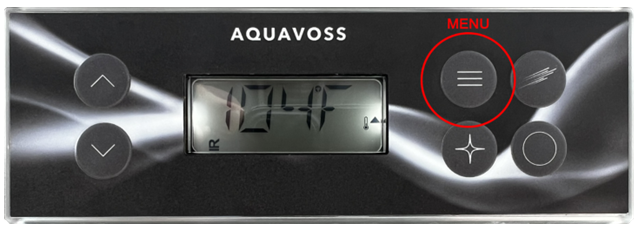
Press the “menu” button (pictured below) until you see the “MODE” menu. Once “MENU is displayed, press the up arrow until the icon changes to an upright “R” (pictured above). Then continue to press the menu button until you exit the menu options and go back to the temperature display.
DOWNLOAD FULL MANUAL HERE:
https://www.balboawater.com/wp-content/uploads/2024/12/TP500S-User-Guide_Eng-3.pdf